On Paper — a private career workspace for resumes and job applications, for macOS and Windows.

Local-first · AI-assisted · source-available

Your career,
clearly put.

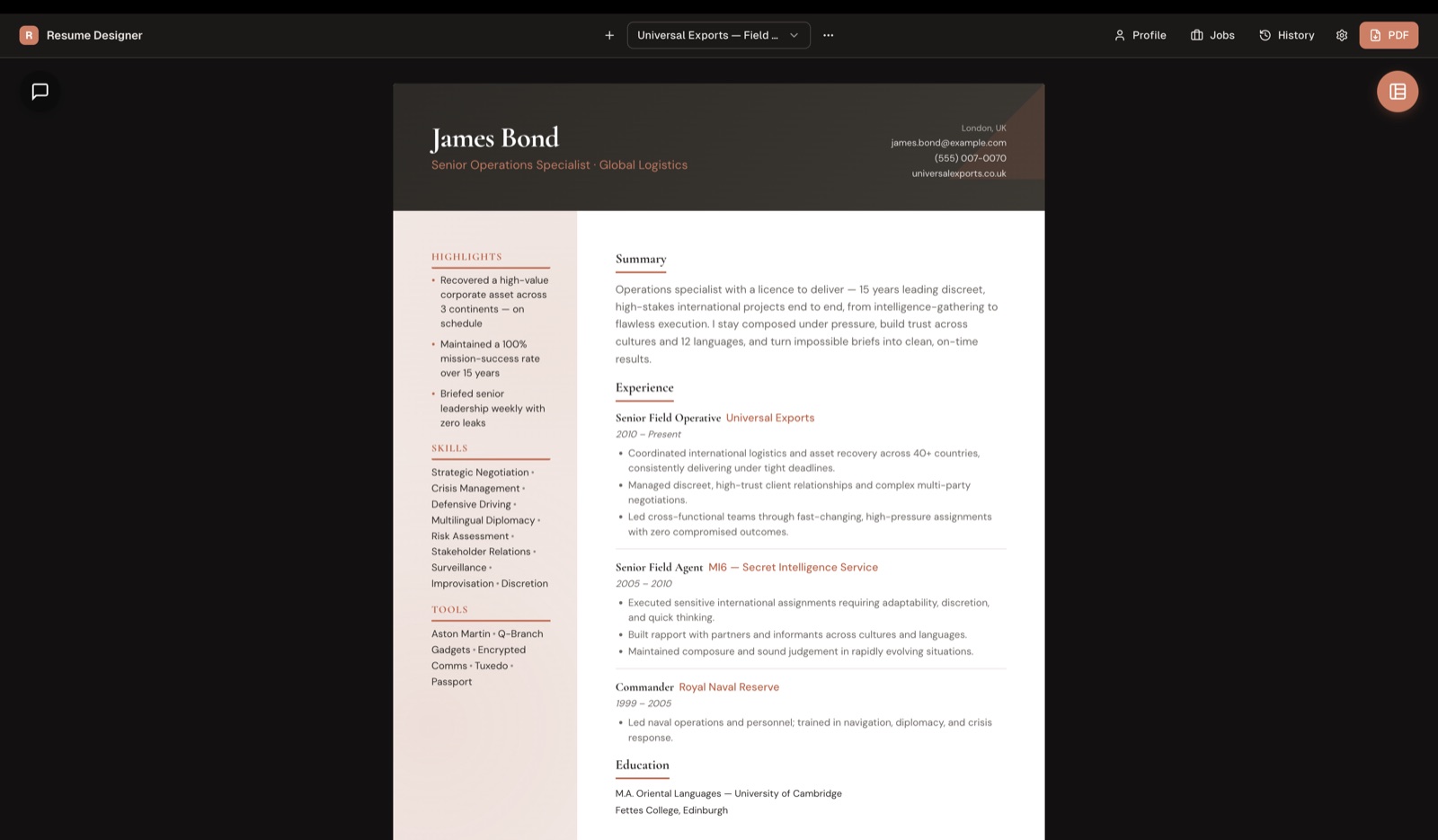
Keep the full story of your experience in one private profile, then shape it into a focused resume for the role in front of you. No On Paper account required.
11
distinct resume layouts
0
required On Paper accounts
1
profile behind every application
macOS · Windows
On Paper app
01 / What it does

One profile, shaped for each role.

Write your history once, then tailor it for the role in front of you. Built for privacy, clarity, and a finished look you'd be glad to send.

One profile, many tailored resumes

Keep your complete work history, skills, education, and projects in a single source of truth — then shape a focused resume for a specific role. Edit the master, and every variant stays in step.

Bring-your-own AI, reviewed as diffs

Paste a job posting and the optional assistant drafts, rewrites, and tailors with your own OpenRouter key — many models, one key, every change yours to approve.

11 layouts, one click

Sidebar, Executive, Timeline, Creative, and more — swap the whole look without retyping a word.

Import & export

Pull a profile straight from a PDF or DOCX, then export clean, multi-page PDFs to send.

Local-first & private

Your documents are stored on your device. On Apple devices, workspace data syncs automatically through your iCloud account when available.

Native desktop app

A native macOS and Windows app with a translucent liquid-glass UI. There's also a browser build you can run from source.

02 / You stay in control

The AI proposes.
You decide.

Paste a job posting and the assistant rewrites your resume against your master profile — applied as inline diffs you review, never a silent overwrite.

  • Streams the model's reasoning live, with a stop control and web-search citations.
  • Pick any model on OpenRouter, with per-model reasoning-effort control.
  • Per-run token and cost stats, so you always know what a draft costs.
Summary · tailored to job posting Review
 Senior product designer with 8 years of experience
−building consumer web apps and design systems.
+leading 0-to-1 product design and scaling design systems for fintech teams.
 Comfortable owning end-to-end work from research
+to shipped, measurable outcomes across iOS and web.
Accept change Reject
03 / Get the app

Download. Open. Build.

Windows
Installer (.exe)
Windows 10 and 11, 64-bit
Unsigned — SmartScreen may warn. Choose "More info → Run anyway."
Update alerts On launch, the desktop app checks GitHub Releases and lets you know when a new version is available — you choose when to install it. Browse all releases on GitHub →
04 / Set up in minutes

Two short setups. Then you're writing.

Set up your OpenRouter key

Optional — only needed for the AI features.

1
Create a free OpenRouter account
Sign up at openrouter.ai — no card required to start.
2
Generate an API key
From your OpenRouter dashboard, create a new key.
3
Paste it into Settings
Drop the key into On Paper's settings panel.
4
Pick a model
Claude, GPT, Gemini, and more — switch any time.
Native apps store your key in the operating system’s credential store and send it to OpenRouter to authorize requests. On Apple devices, it can also sync through iCloud Keychain.

How to use it

From blank profile to polished PDF.

1
Build your master profile
Enter your history by hand, or import an existing PDF or DOCX.
2
Generate or tailor a variant
Paste a job posting and tailor your profile to that role.
3
Review the AI's inline diffs
Approve or reject every change before it lands.
4
Export to PDF
Pick one of 11 layouts and send a clean, multi-page PDF.
05 / Questions

The short answers.

Is it free?
Yes. The app is free and source-available under CC BY-NC-SA 4.0. You can use it to create resumes for personal or commercial work; just don't resell, repackage, or host the app as a paid service. If you use the optional AI, you only pay OpenRouter for what you use — nothing goes to us.
Is my data private?
On Paper stores your work on your device and automatically syncs workspace data through your iCloud account on Apple devices when available. Optional AI shares information needed for your request with OpenRouter and its model providers after you give permission. No On Paper account is required. See the privacy policy for details.
Do I need the AI?
No. The AI assistant is entirely optional. Every other feature — layouts, import, export, variants — works fully without a key.
Wasn't this called Resume Designer?
Yes — this is On Paper, formerly Resume Designer. Same app, same local-first data, same workflow. The new name reflects that it now reaches beyond resumes into the whole application. Your existing profiles and resumes carry over untouched.
Which platforms?
A native desktop app for macOS and Windows. There's also a browser build, but it isn't hosted anywhere — you run it yourself from source.
Source-available · CC BY-NC-SA 4.0

Free to use, study, and reshape.

Licensed under CC BY-NC-SA 4.0. Read the code, fork it, send a pull request — just don't commercialize the app itself without a separate arrangement.

View the repository
Community

Questions? Join the discussion.

Ideas, bug reports, layout requests, or just saying hi — bring them to GitHub Discussions and chat with the project.

Open GitHub Discussions